Excluding libraries from iOS Simulator build in Xcode
I am an iOS developer developing the best-rated banking app in Germany from before it went beta 🇩🇪 I focus on all the aspects of software engineering, from writing good code to developing scalable architectures to enhancing UX and other not-so-much-code-related things. I also put a lot of attention to establishing communication flows and creating a great atmosphere. One of my other focuses is providing a constant flow of cats and memes all over the place. I think in this part I succeeded the most.
Recently I got a problem with 3rd party libraries. My app requires two libraries. Let's call them Cat and CatFood. Library Cat requires library CatFood. While it all works fine on the device, when running on simulator I get a crash, the infamous dyld[]: Library not loaded.
dyld[63616]: Library not loaded: @rpath/CatFood.framework/CatFood
Referenced from: <BC5E3C99-346B-32A2-A5FC-912DFF73B0E0> /Users/.../Debug-iphonesimulator/Cat.framework/Cat
Reason: tried: '/Users/.../Build/Products/Debug-iphonesimulator/CatFood.framework/CatFood'
(mach-o file, but is an incompatible architecture (have 'x86_64', need 'arm64'))

// The very same error going for different paths
// ...
I tried different combinations, and in the end the map of outcomes looks like that:
When linking
CatFoodwithoutCat, the app does not try to reference the library. SoCatFoodjust lies there unusable, and the app runs ✅If I only link
Cat, it tries to referenceCatFood, does not find it, get disappointed and crashes ❌With both,
CatandCatFood, all the resources are there. But during referencing it turns out that noCatFoodversion for simulator is present ("is an incompatible architecture (have 'x86_64', need 'arm64')").Catgets disappointed and crashes ❌
Solution that worked
Link both libraries and then remove the one that is making all the fuss. If there is no Cat library, no one references CatFood and simulator can run normally. Obviously, you won't be able to test it on simulator.. but most likely the missing library just cannot run there anyway.
To remove the annoying Cat library we need three steps:
- Go to
Build Phases

- Add
New Run Script Phase

- Add a script
#!/bin/sh

# Determine if we are building for the simulator
if [[ ${__IS_NOT_SIMULATOR} == "YES" ]]; then
    echo "[Cat] Building for Device - keeping Cat.framework"
else
    # We should exclude Cat when building for simulator. Otherwise it invokes CatFood which has wrong architecture
    echo "[Cat] Building for Simulator - excluding Cat.framework"

    rm -rf "$TARGET_BUILD_DIR/Cat.framework"
    rm -rf "$TARGET_BUILD_DIR/$PRODUCT_NAME.app/Frameworks/Cat.framework"
fi
Then don't forget, when referencing the Cat framework in source code files, we should always check that it's not simulator.
#if !targetEnvironment(simulator)
import Cat
#endif
Upsides
It works! 🥰
It is fairly simple. No need to exclude x86_64 from each and every target. Just a short simple script.
Downsides
Feels hacky: we first add then remove the library;
Hardcoding issues: random folders and internal flags (
__IS_NOT_SIMULATOR) can change later. These problems can be worked around. As soon as issues arise, we can add our own flag for the simulator and inspect the build structure. However, this doesn't always happen when we have time for that.
With that, the practical part is over. Below I'll provide a better but not working solution (as if one needs it :D ). I'll also add some smaller details to the working solution.
Solution that did not work for me
The more logical way is to always link CatFood and link Cat only for non-simulator targets. In theory, one needs to take two steps:
Add framework search path
In
Other linker flagsadd-framework Catfor any iOS device
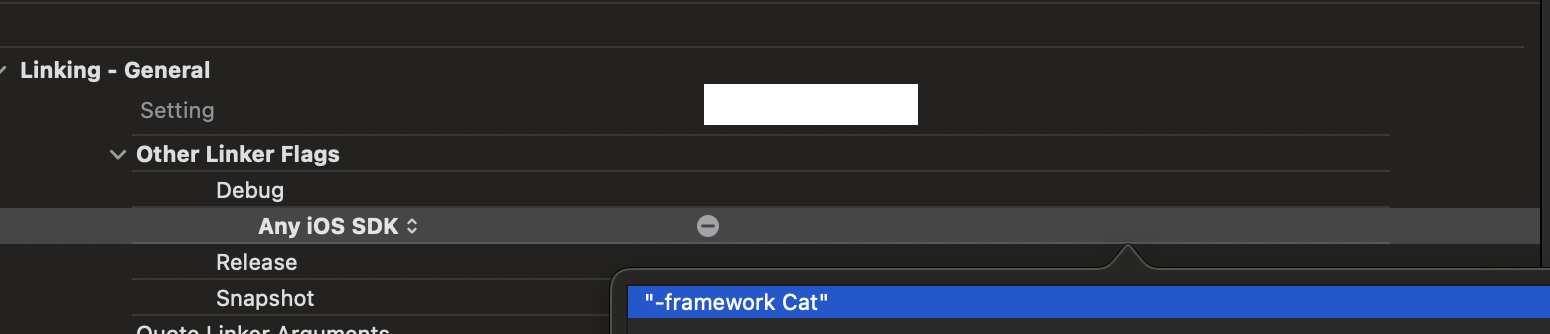
But somehow I could not set it up properly, the framework was never found. If you have a working example, please ping me!
Additional info
__IS_NOT_SIMULATOR flag was inspired by this SO answer https://stackoverflow.com/a/74594391/6624900 (thank you!). While there is no documentation on that to be found, we can validate in Xcode build log that the flag is indeed exported. Add env command to the run script and then check the logs.
PhaseScriptExecution Remove\ Cat\ for\ Simulator /Users/.../Script-E974003F2C19F922008D15BF.sh
...
    __IS_NOT_SIMULATOR_simulator=NO
...
There is unfortunately no not-inverted counterpart like __IS_SIMULATOR.
I still consider using this internal flag to be a superior option to creating an own flag just because it comes from the system itself, we don't need to write additional configuration (and create additional errors).
Instead of conclusion
While it's fun to come up with such solutions, I really hope that you wo't need it :D And we all get only the libraries that can be used universally.
Until the next time 🐈⬛